Project 26: Build an Arduino Smart Trash Can
Ever had your hands full of messy kitchen scraps and struggled to open the trash can? We’re building a fully automated, hands-free smart trash can using an Arduino, an ultrasonic sensor, and a servo motor. When your hand approaches, the lid pops open. A few seconds later, it slams shut. It brings a touch of sci-fi automation right into your kitchen, until the batteries die and you’re locked out of your own garbage.
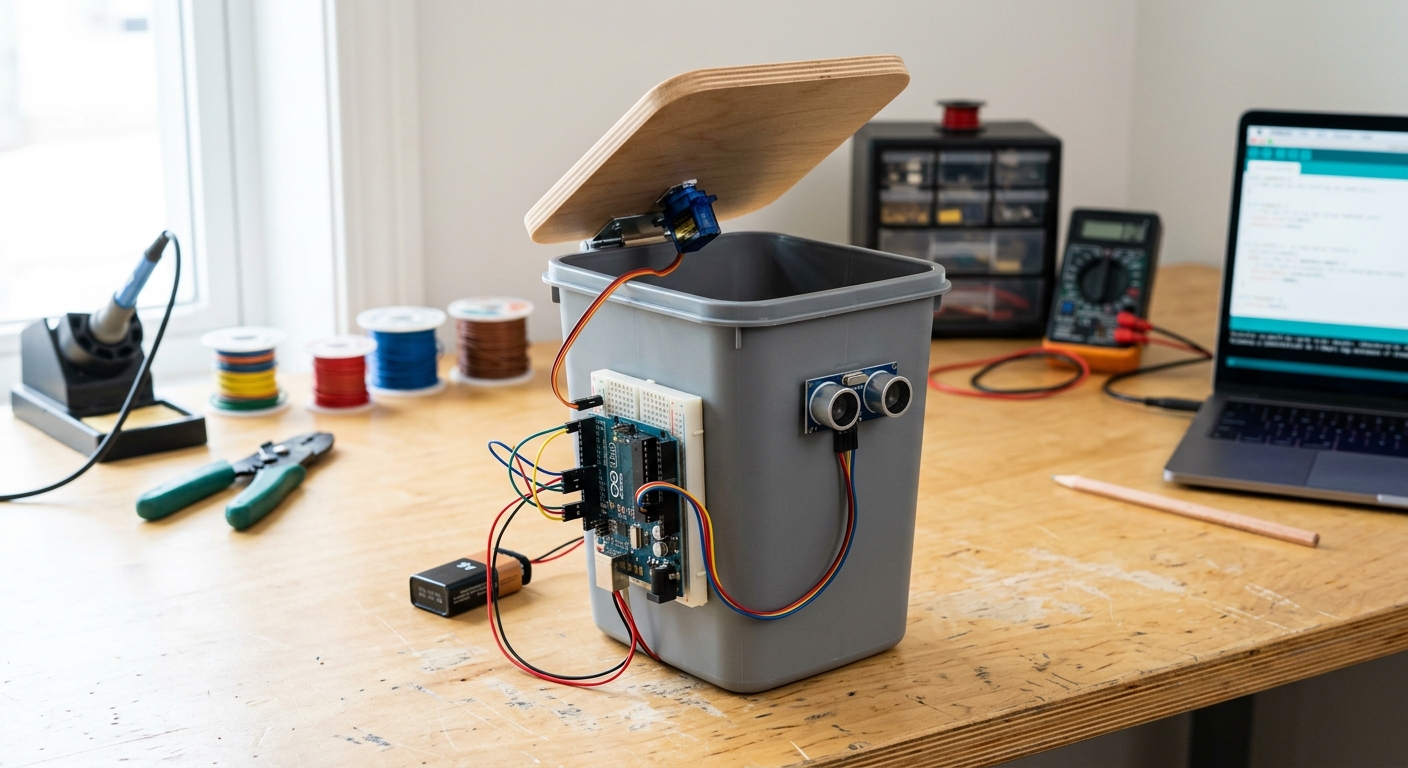
How It Works
The brain of the operation is the Arduino Uno. An HC-SR04 Ultrasonic Sensor sits on or near the lid, continuously sending out high-frequency sound waves. If those waves bounce off your hand and return within a certain timeframe (indicating your hand is close), the Arduino triggers the SG90 Micro Servo, which is physically attached to the hinge of the trash can lid.
Recommended Parts List
We’re going to keep this simple. You can retrofit almost any lightweight desktop or small kitchen trash can with a swinging or hinged lid.
- Arduino Uno Rev3 - The main controller for reading the sensor and moving the motor.
- HC-SR04 Ultrasonic Sensor - For detecting your hand’s distance.
- SG90 Micro Servo Motor - A small, powerful 180-degree motor to lift the lid.
- [Elegoo Breadboard Jumper Wires](https://www.amazon.com/dp/B01EV70C78/?tag=electronparad-20) - For wiring everything up.
(Note: You will also need a small trash can with a hinged lid, some hot glue, and a 9V battery or power bank to power the Arduino).
Wiring the Circuit
- Ultrasonic Sensor (HC-SR04):
- VCC: Connect to the 5V pin on the Arduino.
- GND: Connect to an Arduino GND pin.
- Trig: Connect to Digital Pin 5.
- Echo: Connect to Digital Pin 6.
- Servo Motor (SG90):
- Red Wire (Power): Connect to the 5V pin.
- Brown/Black Wire (GND): Connect to an Arduino GND pin.
- Orange/Yellow Wire (Signal): Connect to Digital Pin 9.
The Code
This code constantly measures the distance using the ultrasonic sensor. If an object is detected within 15 cm (about 6 inches), it moves the servo to open the lid, waits 3 seconds, and then closes it.
#include <Servo.h>

Servo lidServo;
const int trigPin = 5;
const int echoPin = 6;
const int servoPin = 9;

long duration;
int distance;

void setup() {
  pinMode(trigPin, OUTPUT);
  pinMode(echoPin, INPUT);
  lidServo.attach(servoPin);

  // Make sure the lid starts closed (adjust angle as needed for your specific build)
  lidServo.write(0);
  Serial.begin(9600);
}

void loop() {
  // Trigger the sensor
  digitalWrite(trigPin, LOW);
  delayMicroseconds(2);
  digitalWrite(trigPin, HIGH);
  delayMicroseconds(10);
  digitalWrite(trigPin, LOW);

  // Read the echo
  duration = pulseIn(echoPin, HIGH);

  // Calculate distance in cm
  distance = duration * 0.034 / 2;

  Serial.print("Distance: ");
  Serial.print(distance);
  Serial.println(" cm");

  // If hand is within 15 cm, open the lid
  if (distance > 0 && distance <= 15) {
    lidServo.write(90); // Open position
    delay(3000);        // Keep open for 3 seconds
    lidServo.write(0);  // Close position
  }

  delay(100); // Short delay before next reading
}
Assembly Tips
- Mounting the Servo: Use hot glue to attach the body of the servo motor to the inside rim of the trash can, and attach a stiff wire or zip-tie from the servo horn to the lid itself.
- Mounting the Sensor: Drill two small holes in the front of the lid or the rim for the ultrasonic sensor “eyes” to poke through.
- Adjust Angles: Depending on how you mount the servo, you may need to tweak the
lidServo.write(0)andlidServo.write(90)values in the code so the lid closes flush and opens wide enough.