If you have ever hung a picture frame, you know how crucial a level is. But bubble levels are analog, boring, and they don’t beep at you. In this project, we are going to build a Digital Smart Level. We’ll use an accelerometer to measure angles, draw a bubble on an OLED screen, and buzz loudly when it’s perfectly flat. It’s entirely over-engineered, just the way we like it.
How It Works
The MPU-6050 constantly measures the pull of gravity on three different axes (X, Y, and Z). By doing some clever math (which the Arduino handles for us), we can calculate the exact “Pitch” and “Roll” of the sensor.
- Pitch: Tilting forward and backward.
- Roll: Tilting left and right.
We’ll display these real-time angles on the OLED screen. As a bonus, we’ll program the Arduino to trigger the active buzzer when both the pitch and roll hit exactly 0.0 degrees—meaning it is perfectly level!
Hardware You’ll Need
To follow along with this project, you’ll need the following components:
- Arduino Uno R3
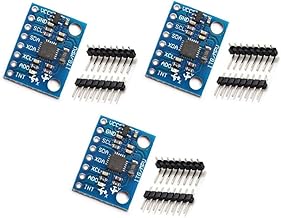
- MPU6050 Accelerometer/Gyro
- 0.96” OLED Display (I2C)
- Active Buzzer Module
- Breadboard
- Jumper Wires
Wiring the Components
Because both the MPU-6050 and the OLED display use the I2C communication protocol, wiring is incredibly easy. They can actually share the same two pins on the Arduino!
OLED Display & MPU-6050 (I2C Bus):
- VCC -> Arduino 5V
- GND -> Arduino GND
- SDA -> Arduino A4 (or dedicated SDA pin)
- SCL -> Arduino A5 (or dedicated SCL pin)
Active Buzzer:
- VCC / + -> Arduino Digital Pin 8
- GND / - -> Arduino GND
The Code
To make this work, you’ll need to install the Adafruit MPU6050, Adafruit SSD1306, and Adafruit GFX libraries via the Arduino Library Manager.
Here is the complete code to run your Smart Level:
#include <Wire.h>
#include <Adafruit_MPU6050.h>
#include <Adafruit_Sensor.h>
#include <Adafruit_GFX.h>
#include <Adafruit_SSD1306.h>

#define SCREEN_WIDTH 128
#define SCREEN_HEIGHT 64
#define OLED_RESET -1
Adafruit_SSD1306 display(SCREEN_WIDTH, SCREEN_HEIGHT, &Wire, OLED_RESET);

Adafruit_MPU6050 mpu;

const int buzzerPin = 8;
const float levelThreshold = 1.0; // Degrees of tolerance

void setup() {
  Serial.begin(115200);
  pinMode(buzzerPin, OUTPUT);
  digitalWrite(buzzerPin, LOW);

  // Initialize OLED
  if(!display.begin(SSD1306_SWITCHCAPVCC, 0x3C)) {
    Serial.println(F("SSD1306 allocation failed"));
    for(;;);
  }
  display.clearDisplay();
  display.setTextColor(WHITE);

  // Initialize MPU6050
  if (!mpu.begin()) {
    Serial.println("Failed to find MPU6050 chip");
    while (1) {
      delay(10);
    }
  }
  mpu.setAccelerometerRange(MPU6050_RANGE_8_G);
  mpu.setGyroRange(MPU6050_RANGE_500_DEG);
  mpu.setFilterBandwidth(MPU6050_BAND_21_HZ);
}

void loop() {
  sensors_event_t a, g, temp;
  mpu.getEvent(&a, &g, &temp);

  // Calculate Pitch & Roll from accelerometer data
  float pitch = -(atan2(a.acceleration.x, sqrt(a.acceleration.y*a.acceleration.y + a.acceleration.z*a.acceleration.z))*180.0)/M_PI;
  float roll = (atan2(a.acceleration.y, a.acceleration.z)*180.0)/M_PI;

  // Update Display
  display.clearDisplay();
  display.setTextSize(1);
  display.setCursor(0,0);
  display.println("Digital Smart Level");

  display.setTextSize(2);
  display.setCursor(0, 20);
  display.print("P: "); display.print(pitch, 1); display.println((char)247);
  display.setCursor(0, 45);
  display.print("R: "); display.print(roll, 1); display.println((char)247);
  display.display();

  // Check if Level (within threshold)
  if (abs(pitch) < levelThreshold && abs(roll) < levelThreshold) {
    digitalWrite(buzzerPin, HIGH); // Beep!
  } else {
    digitalWrite(buzzerPin, LOW);  // Silence
  }

  delay(100);
}
Wrapping Up
Once you upload the code, securely tape or mount your breadboard to a flat, sturdy object (like a small piece of wood or an empty Altoids tin). As you tilt the object, you’ll see the exact degrees update instantly on the OLED. Once you hit exactly 0 degrees (within our 1.0 degree tolerance threshold), the buzzer will sing!
You’ve just built a precision measurement tool using less than $20 worth of parts. Happy making!