Lesson 184: Scrolling Text with the MAX7219 8x8 LED Matrix
If you want to build a scrolling news ticker or a retro text display without wiring hundreds of individual LEDs, the MAX7219 8x8 LED Matrix is perfect. It’s incredibly bright, visible from across the room, and requires vastly less processing power than NeoPixels. Time to scroll some aggressive messages across your desk.
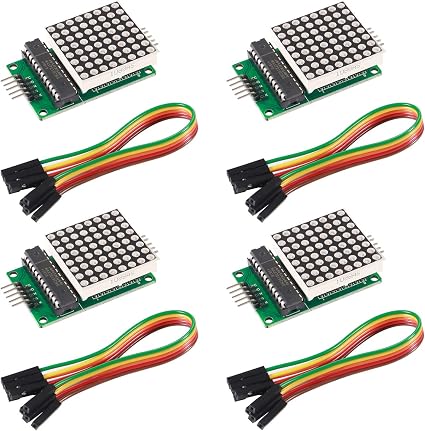
What is the MAX7219?
The MAX7219 is a display driver chip. By itself, an 8x8 LED matrix has 64 individual LEDs. If you wanted to control them all directly, you would need 64 pins on your Arduino (which you don’t have!).
Even if you “multiplex” them, you’d still need 16 pins and constant processing power to scan the rows and columns so fast that the human eye doesn’t see them flickering.
The MAX7219 chip handles all of this for you. You send it data using SPI (Serial Peripheral Interface) using only 3 data pins, and the chip does all the heavy lifting of keeping the LEDs lit. Better yet, you can daisy-chain multiple modules together to make an ultra-wide scrolling display!
Recommended Gear
- MAX7219 8x8 LED Matrix Module (Often sold in packs of 4 chained together).
- Female-to-Male Dupont Jumper Wires
- Your standard Arduino Uno.
Wiring the Module
The MAX7219 uses the SPI protocol. Connect it to your Arduino as follows:
- VCC -> 5V on Arduino
- GND -> GND on Arduino
- DIN (Data In) -> Pin 11 (MOSI)
- CS (Chip Select) -> Pin 10
- CLK (Clock) -> Pin 13 (SCK)
Note: If you are chaining multiple modules, connect the DOUT of the first module to the DIN of the next.
The Code: Displaying a Smiley Face
To make programming incredibly easy, we’ll use the LedControl library. Go to Sketch -> Include Library -> Manage Libraries and search for LedControl by Eberhard Fahle.
Here’s a simple sketch to display a smiley face:
#include <LedControl.h>

// Pins: DIN, CLK, CS, Number of Devices
LedControl lc = LedControl(11, 13, 10, 1);

// A byte array representing our 8x8 smiley face
byte smiley[8] = {
  B00111100,
  B01000010,
  B10100101,
  B10000001,
  B10100101,
  B10011001,
  B01000010,
  B00111100
};

void setup() {
  lc.shutdown(0, false);       // Wake up the MAX7219
  lc.setIntensity(0, 8);       // Set brightness (0 to 15)
  lc.clearDisplay(0);          // Clear the display
}

void loop() {
  // Loop through all 8 rows and push the byte data
  for (int row = 0; row < 8; row++) {
    lc.setRow(0, row, smiley[row]);
  }
  delay(1000);
}
How the Code Works
Notice the byte smiley[8] array. The B prefix tells the Arduino this is a Binary number.
Every 1 turns on an LED, and every 0 leaves it off. If you squint at the 1s and 0s in the code above, you can actually see the smiley face drawn in the text!
In the next lesson, we’ll combine this with the MD_Parola library to create smooth scrolling text and animations!