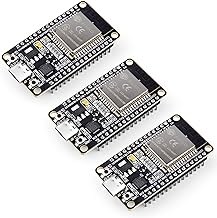
Today, we’re taking our ESP32 and forcing it to host a website, because why should your laptop have all the fun? Have you ever wanted to turn on a light from your phone without standing up? By setting up a web server on your ESP32, you can host a tiny, poorly-styled HTML page that actually controls hardware. Welcome to the future of laziness.
What You’ll Need:
- ESP32 Development Board
- An LED and a 220-ohm resistor (for testing output)
- A breadboard and jumper wires
- A local Wi-Fi network
How It Works
The ESP32 connects to your local Wi-Fi network and listens for incoming HTTP requests on port 80. When you type the ESP32’s IP address into your browser, it serves up a simple HTML page. We can add buttons to that page, and when you click them, the browser sends a request back to the ESP32, telling it to toggle a pin!
The Code
Here is a basic sketch to get you started. Make sure to replace YOUR_SSID and YOUR_PASSWORD with your actual Wi-Fi credentials.
#include <WiFi.h>
#include <WebServer.h>

// Replace with your network credentials
const char* ssid = "YOUR_SSID";
const char* password = "YOUR_PASSWORD";

// Set web server port number to 80
WebServer server(80);

// Assign output variables to GPIO pins
const int ledPin = 2; // Built-in LED usually

void handleRoot() {
  String html = "<html><body><h1>ESP32 Web Server</h1>";
  html += "<p><a href=\"/on\"><button>Turn ON</button></a></p>";
  html += "<p><a href=\"/off\"><button>Turn OFF</button></a></p>";
  html += "</body></html>";
  server.send(200, "text/html", html);
}

void handleOn() {
  digitalWrite(ledPin, HIGH);
  server.sendHeader("Location","/");        // Redirect back to root
  server.send(303);
}

void handleOff() {
  digitalWrite(ledPin, LOW);
  server.sendHeader("Location","/");        // Redirect back to root
  server.send(303);
}

void setup() {
  Serial.begin(115200);
  pinMode(ledPin, OUTPUT);
  digitalWrite(ledPin, LOW);

  // Connect to Wi-Fi
  Serial.print("Connecting to ");
  Serial.println(ssid);
  WiFi.begin(ssid, password);
  while (WiFi.status() != WL_CONNECTED) {
    delay(500);
    Serial.print(".");
  }

  Serial.println("");
  Serial.println("WiFi connected.");
  Serial.println("IP address: ");
  Serial.println(WiFi.localIP());

  // Define routing
  server.on("/", handleRoot);
  server.on("/on", handleOn);
  server.on("/off", handleOff);

  server.begin();
  Serial.println("HTTP server started");
}

void loop() {
  server.handleClient();
}
Next Steps
- Upload the code to your ESP32.
- Open the Serial Monitor (at 115200 baud) to find the assigned IP address.
- Enter the IP address into your phone or computer’s web browser.
- Tap the buttons to control the LED!
Once you have this basic server running, the possibilities are endless. You can expand the HTML to read sensor data, control relays, or build a complete dashboard. Happy coding!
Hardware You’ll Need
To follow along with this lesson, you’ll need the following components: